Case study · Modernising HubSpot's Knowledge Base
Knowledge Base.
A tool in maintenance mode had become the largest source of complaints for HubSpot's customer-service product. As lead designer, I ran a two-phase project. First, ship multiple knowledge bases to unblock upmarket sales. Then, move the whole tool onto HubSpot's modern content platform.
- Role
- Lead Product Designer · end to end
- Team
- Customer service & content platform
- Timeline
- 2022 to 2024 · overlapping phases
- Priority
- P0 · top company priority
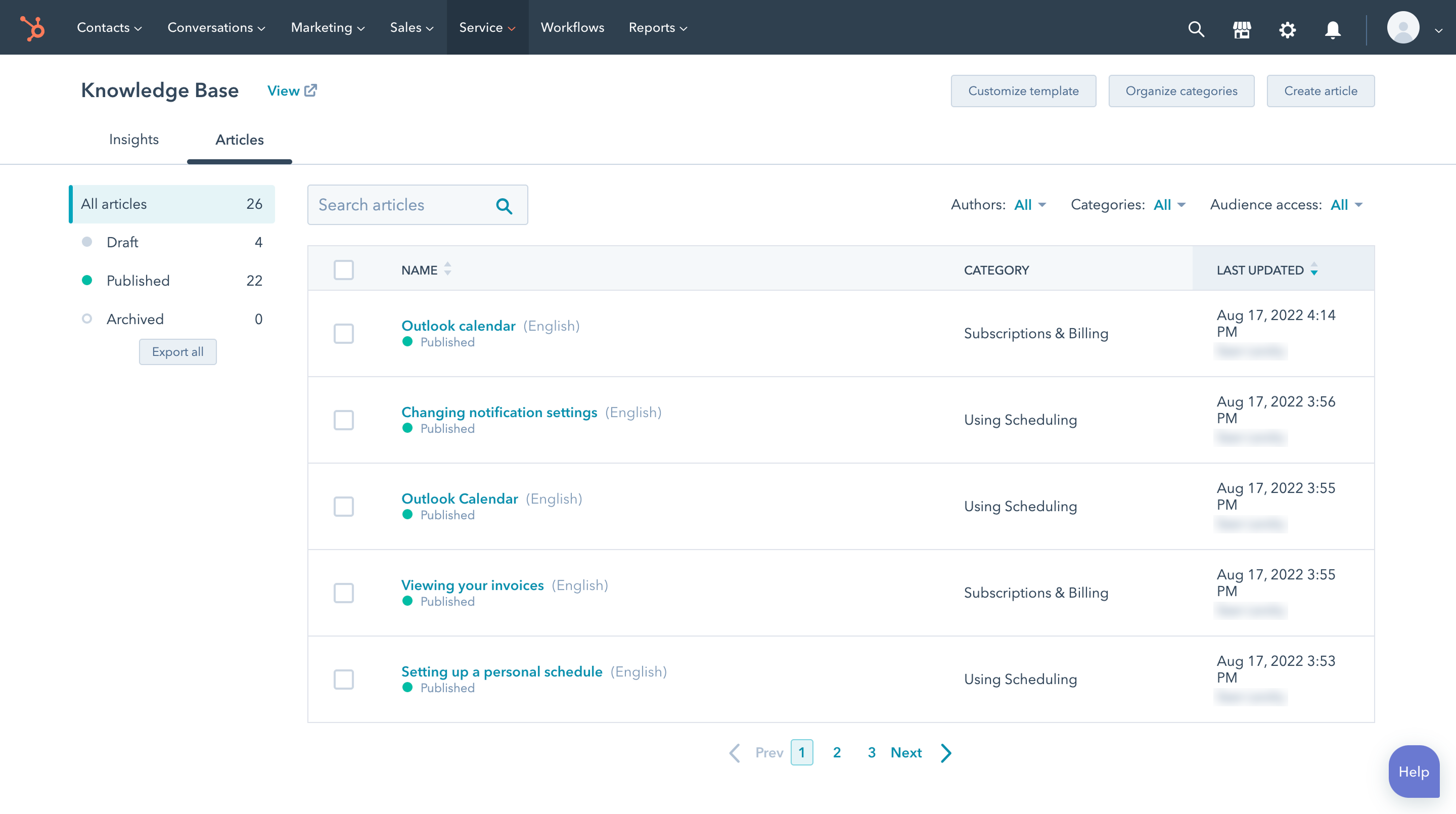 Before
Legacy tool
The original Knowledge Base
The tool on its pre-platform infrastructure. Template and category settings each had their own button.
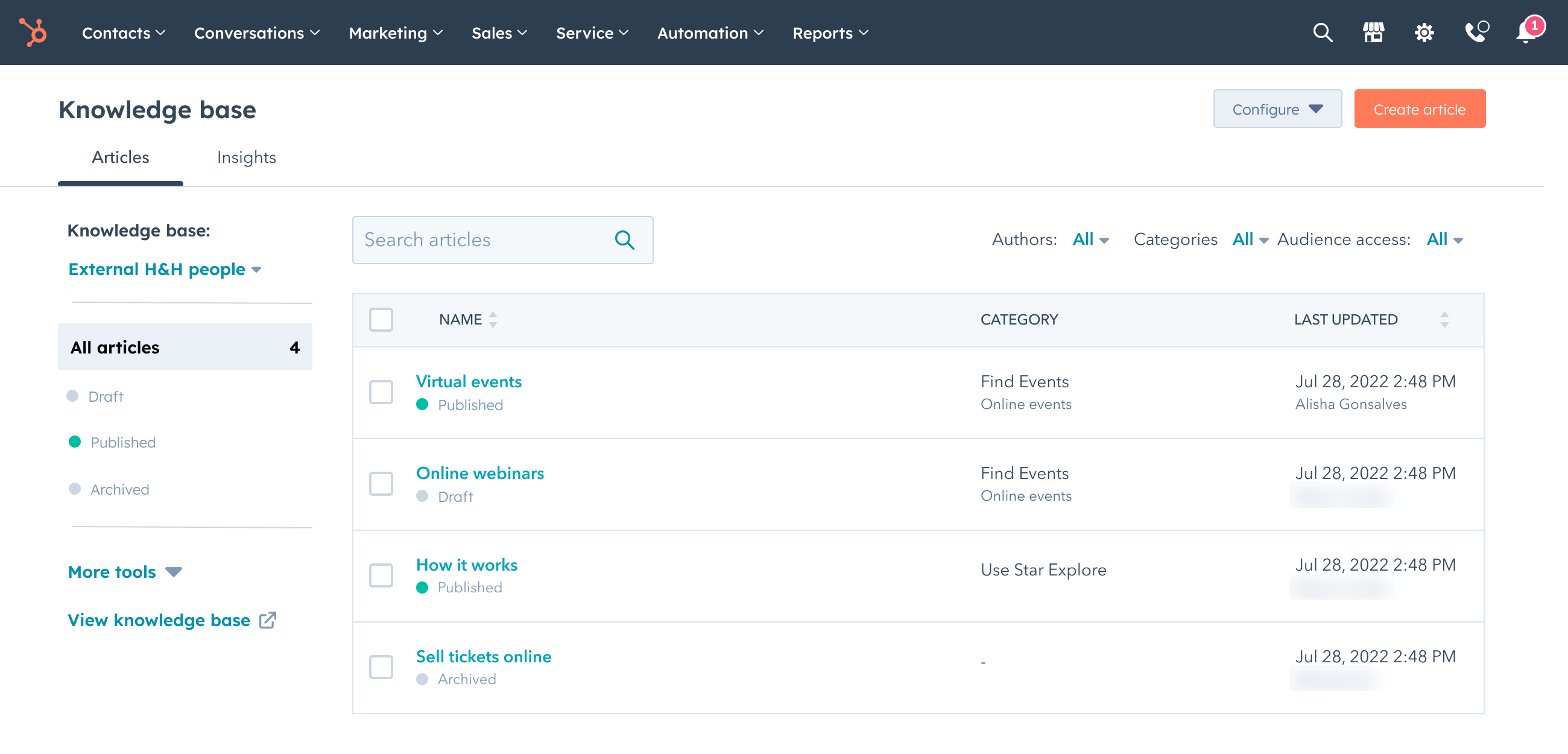 After
AfterContent platform
Rebuilt on the content platform
The same view on the platform HubSpot’s blog and website use. Settings now sit under one Configure menu.
The landscape
Where this sits
New to HubSpot? Here's where the Knowledge Base tool has lived. It moved twice before this case study starts.
Level 01 · Platform
HubSpot
Marketing, sales, service, content, data and revenue teams all work from one shared customer record.
Level 02 · Hub · where it started
Service Hub
The Knowledge Base tool started in Service Hub, HubSpot’s customer-service product, next to support tickets and chat.
→ moved to
Level 02 · Hub · where it moved
Content Hub
HubSpot later grouped its content tools under Content Hub: blog, website pages and Knowledge Base. These products share an editor and a way of publishing.
Level 03 · This work
Knowledge Base
My team. The tool moved again, onto HubSpot’s shared content platform. That move is what this case study covers.
Context
A problem hiding in a maintenance-mode tool
Knowledge bases let businesses publish help articles, so customers can solve problems without contacting support. HubSpot built its Knowledge Base tool in 2017, before its shared platform existed. In 2019 the tool went into maintenance mode. By 2022 it drew more feedback than any other part of the product, and it was getting worse.
How it got here
2017
Built before the platform
HubSpot launches its Knowledge Base tool on older infrastructure.
2019
Maintenance mode
New investment stops. Only essential fixes ship.
2022
#1 source of feedback
More complaints than any other part of the product. This work begins.
The customer view
- The Knowledge Base tool was the largest source of feedback on HubSpot’s customer-service product. Complaints were still rising every quarter.
- Multiple knowledge bases was the community’s #1 unmet request, with more votes than any other.
- Customers bought second HubSpot portals or moved to competitors to work around it.
- Branding, categories and customisation were all limited.
The business view
- Multiple knowledge bases was the #1 deal-blocker for Enterprise accounts.
- We lost recurring revenue every quarter to the missing feature.
- By a conservative estimate, missed revenue had reached six figures since 2018.
- Platform improvements didn’t reach the tool, so every fix was expensive.
The problem
Upmarket customers couldn't create multiple knowledge bases, the top deal-blocker for Enterprise accounts. The tool itself was cut off from HubSpot's modern content platform, so every fix was slow and expensive.
Strategy
Splitting a two-year problem into two phases
We had two linked problems. Customers couldn't create multiple knowledge bases, and the tool was cut off from the modern content platform. Solving both at once would have been slow and risky. So we split the work into phases. We shipped value to customers first on the old infrastructure, and started scoping the harder platform move once the team knew enough to take it on.
Knowledge Base two phases timeline
Phase 1 · Q3 to Q4 2022
Multiple knowledge bases
Phase 2 · Q4 2022 to 2023
Scoping, alongside Phase 1
Platform migration · shipped 2023
Phase 1
Q3 to Q4 2022Multiple knowledge bases on the old infrastructure
Build the feature on the existing infrastructure, reusing patterns from the blog tool. Ship fast to unblock upmarket deals, build trust across the product trio (PM, engineering and design), and buy time for the bigger rebuild.
Phase 2
Scoping from Q4 2022 · shipped 2023Platform migration
Rebuild the Knowledge Base tool on HubSpot’s content platform. Adopt the shared editor, connect to content management system (CMS) themes, and design how existing customers move across.
Why phasing mattered
Our product trio of PM, engineering and design was new. Starting with a small, urgent problem helped us learn to work together. That trust let us start scoping the platform move with other teams well before Phase 1 shipped, and we relied on it for the harder work that followed.
Research
Using research to break a deadlock
As we planned the move, one question split the room: what should writing an article feel like? One group wanted the editor to show the full page, with header, footer and navigation. The other wanted a focused editor with only the article. Rather than let it stall the roadmap, I planned and ran a moderated concept test so users could settle it.
Moderated concept test
Participants
12 people: 6 HubSpot Knowledge Base users and 6 competitor-tool users
Output
Preferences, task success and the reasons behind them
Empathy sessions
Participants
Private-beta customers of the new feature
Output
Feedback from real use, and what to change next
Community forum analysis
Participants
A 760-vote thread and related requests
Output
How and why customers wanted multiple knowledge bases
Competitive analysis
Participants
Zendesk, Intercom, Helpjuice, Document360
Output
Benchmarks for pricing, structure and customisation
Key finding
7 of 12
participants preferred the article-only editor. They called it “simple” and “straightforward,” and said it helped them “stay focused.” Those who preferred the full-page editor were mostly admins who managed the header and footer.

“I felt like it was very tailored to just an article, and it helped me stay more focused. I believe that one would have a higher productivity.”

“I definitely lean towards the core-focused one. I was confident in there. In the other, I was searching around a lot and it was hard to find what I needed.”
Findings that reshaped scope
wanted collaboration and approvals when writing articles. It became a main roadmap item.
drafted articles outside the tool because they couldn’t collaborate inside it.
wanted version control. We mapped this onto the platform’s revision history.
expected to preview an article before publishing.
Why this mattered beyond the Knowledge Base
The research reached beyond our team. It shaped a top 2023 project for HubSpot's content editor team, showing gaps in their editor plan and pointing them to the features that mattered most. It also ended the disagreement that had stalled our own roadmap.
Design
Designing across two products and five platform teams
The design work had two tracks: multiple knowledge bases on the old infrastructure, and the full platform rebuild. The rebuild meant working with five platform teams: themes, editor, structured content, publishing and DDC. Each had its own roadmap and design language.
Track 01 · Multiple knowledge bases on the old infrastructure
The blog tool already supported multiple blogs, so I reused its patterns. Customers who knew that setup could use the same navigation, naming and setup flow here, with nothing new to learn. Each knowledge base got its own domain, branding, categories, content and analytics. We set limits of 5 per account and 2,000 articles each, based on what the old infrastructure could handle.
Track 02 · Platform migration
Article editor
Built for writing articles. It includes a table of contents, accordions, rich media, preview, related-article links and approval flows.
Category management
Replaced the slow legacy screen with drag and drop. After launch, we fixed smaller issues with permissions and special characters.
Theme integration
Knowledge base templates now use CMS themes and brand kit values, so the knowledge base, blog and website look consistent.
Migration design
An opt-in flow with a beta agreement, screens explaining what changes, feature-parity checks, and updates based on alpha and beta groups.
System architecture mapping
Documented the old subsystems and mapped each template setting to its new home in themes, headers, footers or categories.
The editor decision · siding with users, keeping the room together
The research pointed clearly to an editor built for writing articles. Not everyone had hoped for that answer, so I shared the findings openly, including where the full-page view still mattered to admins. The evidence was strong, and I kept the conversation focused on what users needed.
I also wanted the other side to stay on board. So I proposed a release plan. We shipped an interim editor to a small group of low-risk alpha users straight away, to get real feedback. Then we quickly replaced it with the full platform editor for every release after. This lowered the risk of the launch, kept us moving, and gave the other side a way to have their concerns tested with data.
Impact at a glance
in net-new ARR from customers who upgraded to a top-tier plan and turned the feature on (March to September 2023).
activation rate, well ahead of the team’s internal target.
positive customer satisfaction after launch.
votes on the #1 community request, now resolved.
Outcomes
What it added up to
Phase 1 · Multiple knowledge bases
- 13.6% activation rate, well ahead of the team’s internal target.
- Six figures in net-new ARR from Enterprise upgrades.
- Recently upgraded Enterprise accounts turned it on more than new or existing ones. The feature helped drive upgrades.
- Over 90% positive customer satisfaction after launch.
Phase 2 · Content platform
- A modern editor with drag and drop, revision history, undo and redo, and richer content modules.
- The Knowledge Base tool now uses the same themes as websites and blogs.
- Category drag and drop shipped, then improved through real feedback.
- The tool now gets future content platform improvements automatically.
Customer feedback after launch
“Super easy to do! Took less than 2 minutes to complete.”
“I've been waiting for this feature, and it's super easy to use. Thank you.”
Broader impact
- A key project in the customer-service product’s push to serve mid-market customers.
- Moved the content platform closer to its goal of bringing more products onto one shared system.
- The article editor research shaped the roadmap of HubSpot’s content editor team.
- Wrote a documented process for other HubSpot teams moving onto the content platform.
Reflection
What I took away
What worked
Phased strategy
Shipping multiple knowledge bases first built trust in the team, gave customers value straight away, and bought time for the harder platform work.
What worked
Research as a neutral decision tool
Concept testing turned a stand-off between stakeholders into a recommendation based on users. The findings also helped the wider content platform team.
What worked
Lowering risk through how we released
The interim editor let us ship early, gather real feedback and keep improving, without giving up on the final vision.
What I’d change
Map how migration feels, earlier
Customers use the Knowledge Base tool every day. Being asked to switch to a new version causes real worry. I’d map how migration feels for customers earlier, alongside the steps.
What I’d change
Align scope across teams sooner
With so many teams involved, I’d run structured scope sessions at the start to avoid delays later.
Together, these two projects earned my promotion from Product Designer to Senior Product Designer.